Once you start adding a monitor, a microphone, or a small LED light to a camera rig, you run into a problem the camera’s built-in mounting points were never designed to solve: everything needs its own angle, its own position, and its own way of staying put without interfering with everything else attached nearby. This is exactly the gap a magic arm fills — a short, fully articulating connector that lets you position an accessory almost anywhere around your main rig and lock it there.
At HSU we design and build camera support hardware, and the dual ball head magic arm is one of the accessories that quietly ends up in almost every serious setup once people start layering on monitors, mics, or secondary cameras. This guide covers what it actually does, where it’s the right tool, and what to look for, using our own Aluminum Alloy Magic Arm with Dual Ball Head as a reference point.
What a Dual Ball Head Magic Arm Actually Does
A magic arm is a short rigid link with a ball-and-socket joint at each end, letting you connect two things — a mount and an accessory — while independently adjusting the angle at both connection points.
- Two ball heads means two independent points of adjustment. One end can be locked at one angle while the other end swivels freely, which is what lets you position an accessory (a mic, a small monitor) at almost any angle relative to your camera or rig, rather than being limited to whatever angle a single fixed joint allows.
- A thumbscrew locking mechanism holds the position once you’ve dialed it in. Rather than needing tools, a single thumbscrew tightens both ball joints simultaneously, so you can adjust freely with your hands and then lock the whole arm rigid with one twist.
- Universal 1/4″-20 threading on both ends is what makes it broadly compatible — this is the same standard thread size used across monitors, camera cages, small LED lights, microphones, and action camera mount adapters, so the arm isn’t locked into one specific accessory type.
Where This Type of Arm Is the Right Tool
A magic arm solves a specific category of problem: connecting an accessory to your rig at a custom angle, in a spot where a standard fixed mount wouldn’t work.
Common uses:
- Mounting a small external monitor at an angle you can actually see clearly while operating the camera, rather than wherever a fixed cold-shoe mount happens to point
- Positioning a microphone off to the side or above frame, independent of the camera’s own angle — useful when the mic needs a different angle than the lens
- Adding a small LED light at a custom angle for fill lighting, without needing a separate light stand
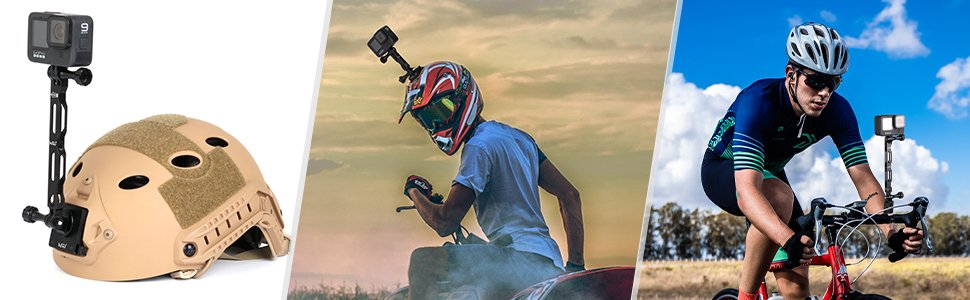
- Attaching an action camera as a secondary angle on a larger rig, cage, or handlebar setup, giving you a second POV without a second full mounting system
Where it’s not the ideal choice: for anything heavier than roughly 1.5kg (3.3lb), a single small magic arm isn’t built to hold the load reliably — larger monitors or heavier lighting setups need a larger-format arm or a different support system entirely. Checking the rated load capacity before mounting anything heavier than a phone, small light, or compact mic is worth doing.
What to Check Before Buying One
- Load capacity vs. what you’re actually mounting. The HSU version, for example, is rated for up to 1.5kg (3.3lb) at roughly 69g of its own weight — enough for a small monitor, a compact mic, or an action camera, but not a heavier DSLR or a large light panel.
- Aluminum construction over cheaper alloys or plastic. Aluminum alloy resists corrosion and holds its rigidity under repeated tightening and loosening, which matters if you’re adjusting the arm frequently between shoots. A lower-quality metal or plastic joint tends to develop play over time, even if it feels fine when new.
- A single-thumbscrew lock rather than two separate ones. Locking both ball joints with one thumbscrew is faster to set up on location and less likely to have one joint accidentally left loose while the other is tightened.
- Confirm the thread size matches your accessory. 1/4″-20 is the most common standard across monitors, mics, and action camera adapters, but some larger accessories use 3/8″ threading — check what your specific gear needs before assuming universal compatibility.
How to Set One Up
- Attach one end to your fixed mounting point — a cold shoe, cage rail, or tripod thread — using the 1/4″-20 screw.
- Attach your accessory to the other end the same way.
- Adjust both ball joints to the angle you want while the thumbscrew is loose, moving the accessory into position before locking anything down.
- Tighten the thumbscrew fully — a half-tightened joint can shift under the accessory’s own weight, especially with anything at the heavier end of the arm’s rated capacity.
- Check the hold with a light shake before you start relying on it, particularly if the setup will be moving (handheld, vehicle-mounted) rather than staying static on a tripod.
Frequently Asked Questions
Can a magic arm hold a full-size camera monitor?
It depends on the monitor’s weight and the arm’s rated load capacity. Small magic arms (rated around 1-1.5kg) are built for compact monitors, action cameras, mics, and small lights — a larger production monitor typically needs a bigger-format arm or a dedicated mounting system.
Does the dual ball head design make it less stable than a single-joint arm?
Not when properly tightened — a single thumbscrew locks both joints simultaneously, so a correctly tightened dual ball head arm holds just as rigidly as a single-joint design, while offering more positioning flexibility. The stability comes from how fully it’s tightened, not the number of joints.
Will the joints loosen over time with repeated adjustment?
A well-made aluminum arm with quality ball joints should hold up to regular adjustment without developing noticeable play, though any mechanical joint will show some wear eventually with heavy daily use. Aluminum construction specifically resists the kind of degradation that softer metals or plastic joints show sooner.
Is this the same thing as a “magic arm clamp”?
Not quite — a magic arm is just the articulating connector itself, while a magic arm clamp adds a super clamp on one end for attaching to a bar, rail, or edge (like a desk or tripod leg) instead of a threaded mount. Some setups use both together: a clamp at one end and a magic arm’s ball joints doing the positioning.
Final Thoughts
A dual ball head magic arm is a small piece of hardware that solves a specific, common problem: getting an accessory into the exact position and angle a fixed mount can’t reach. The details worth checking before buying one are straightforward — rated load capacity against what you’re actually mounting, aluminum construction over cheaper alternatives, and a single reliable locking mechanism. Get those right, and it becomes one of those accessories you barely think about because it just holds position exactly where you put it.
About the author: This guide is written and maintained by HSU’s product team, who design and test camera support hardware including magic arms, mounts, and rigging accessories for action cameras, monitors, and audio gear. Specifications and compatibility notes are based on hands-on product testing and are updated as accessory standards evolve.