Most cameras give you exactly one accessory shoe on top. That’s fine until you want an external microphone, a small LED light, and a monitor all at once. Suddenly three accessories are competing for one slot, and the usual workarounds, taping things on or stacking adapters until the whole rig leans, tend to end badly.
A triple-head cold shoe bracket solves this with a single, simple piece of aluminum: one connection point to your camera, three mounting slots for your accessories. At HSU we design and test camera support hardware, and this is one of those small accessories that quietly changes how a rig works. This guide explains what a cold shoe bracket is, what to put on it, and how to set it up without making your camera top-heavy, using our own Triple-Head Cold Shoe Mount Bracket as the example.
Cold Shoe vs. Hot Shoe: A Quick Explanation
The accessory slot on top of most cameras comes in two flavors, and the terms get mixed up constantly.
- A hot shoe has electrical contacts that let the camera communicate with a flash. It’s what you slide a flash unit into to trigger it.
- A cold shoe has no electrical contacts. It’s a purely mechanical slot that holds accessories like microphones, LED lights, and monitors, which are powered separately.
The two use the same physical rail shape, which is why a cold shoe accessory slides into a hot shoe slot without trouble. The difference is only in whether the contacts do anything. For a microphone, light, or monitor, you don’t need the contacts, so a cold shoe bracket works on either.
What a Triple-Head Bracket Actually Does
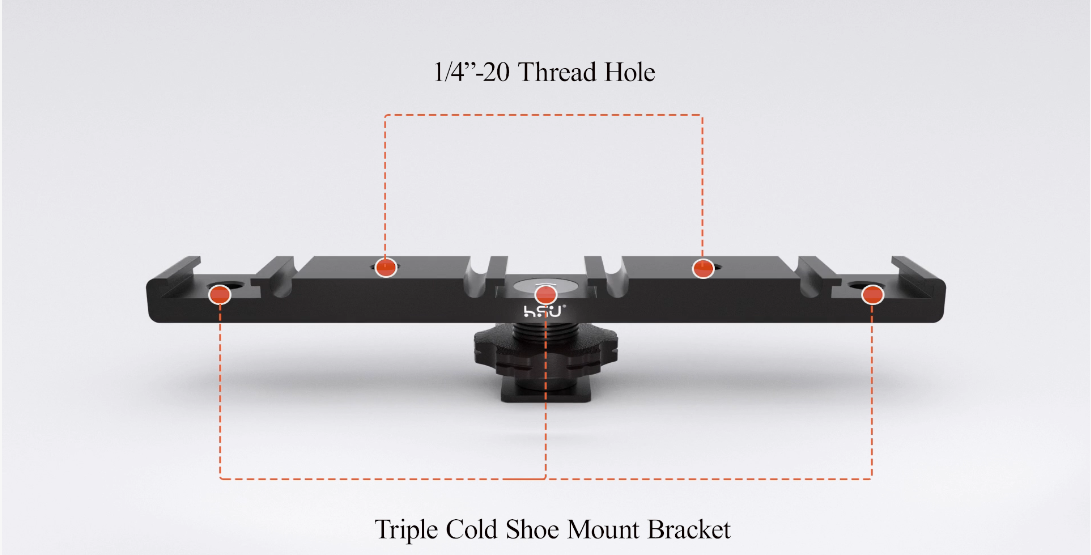
The bracket is a short bar with a slot that connects to your camera and three cold shoe mounts along its length. Each of the three mounts accepts a standard accessory. Here’s what the HSU design includes:
- Three cold shoe mounts for attaching several accessories side by side
- A 1/4″ screw port, the same thread size used on tripods, magic arms, and camera cages, so you can connect the bracket to other support gear
- A cold shoe adapter design on the bottom, so the bracket itself mounts to the cold shoe on your camera or another device
- A cable slot to help keep cables from dangling in front of the lens or catching on things
- Aluminum alloy construction that is lightweight, rustproof, and durable
What to Mount on It
| Accessory | Why It Goes on the Bracket |
|---|---|
| Shotgun or on-camera microphone | Gets audio close to the subject and separate from the camera body vibration |
| Small LED video light | Adds fill light or a catchlight without needing a separate stand |
| Compact external monitor | Lets you check framing and focus at a better angle than the camera’s own screen |
| Wireless receiver | Keeps a lavalier or wireless mic receiver neatly attached to the rig |
| Small flash or secondary light | Gives you another light source for a more even look |
Common Setups
- Vlogging rig: microphone on one slot, LED light on another, and a small monitor or wireless receiver on the third.
- Interview setup: microphone and receiver together, plus a light angled at the subject.
- Documentary or run-and-gun: a mic and a light, with the third slot left free for a monitor you can attach only when you need it.
- Product and tabletop video: two small lights and a monitor, mounted on a camera that sits on a tripod.
How to Set It Up Without Making the Camera Top-Heavy
Three accessories on top of a camera adds weight in a spot where weight is awkward. A few habits keep the rig usable:
- Put the heaviest accessory closest to the center. Weight far from the camera’s center of balance makes the whole rig tilt and tires your hand faster.
- Balance left and right. If you mount a mic on one end and a light on the other, the weight roughly offsets. Two heavy items on the same side pull the camera sideways.
- Check each accessory’s weight against your camera’s shoe. Camera shoes are not designed for heavy loads. Small monitors, mics, and lights are fine, but large heavy panels may strain the shoe. Check your camera’s manual if you’re unsure.
- Tighten every accessory fully, then wiggle each one. Anything that shifts will vibrate in your footage or audio.
- Route cables through the slot and keep them out of the frame. Dangling cables are one of the most common causes of accidental frame obstruction and unwanted noise.
Using the 1/4″ Screw Port
The 1/4″ thread is the most common standard in camera support gear, which makes the bracket more than just a shoe extender. It lets you:
- Attach the bracket to a magic arm, so you can position the whole accessory cluster away from the camera
- Mount it to a tripod or handle grip, for a standalone accessory station
- Combine it with a camera cage, extending the number of accessories a cage can carry
This flexibility is what turns a simple bar into a modular part of a larger rig.
What to Check Before Buying One
- Material. Aluminum alloy keeps weight down and resists corrosion. Cheap plastic versions tend to flex or crack, especially when loaded with a heavy mic or monitor.
- Number and spacing of mounts. Three slots are useful only if the spacing lets you fit your actual accessories side by side without them touching.
- Thread standard. 1/4″ is the most common, but confirm your support gear uses the same size.
- Secure fit in the camera shoe. A bracket that wobbles in the slot will wobble in your footage. The fit should be snug with no side-to-side play.
Frequently Asked Questions
Will it work on a hot shoe?
Yes. A cold shoe bracket slides into a hot shoe slot because the physical rail is the same. The electrical contacts simply aren’t used.
Can I mount a flash on it?
You can physically mount a small flash, but it won’t trigger from the camera because the bracket has no electrical contacts. You’d need a separate wireless trigger.
How much weight can it hold?
That depends on the bracket and, more importantly, on your camera’s shoe, which is usually the limiting factor. Stick to small, lightweight accessories and check your camera manual for its shoe load guidance.
Does it work with action cameras and phones?
Not directly, since action cameras and phones don’t have a cold shoe. You can connect them using a cage or adapter with a cold shoe mount, and then add the bracket on top.
Do I need all three slots filled?
No. Many people mount two accessories and leave the third free for flexibility. An empty slot is also handy for a quick temporary monitor or light.
Final Thoughts
A triple cold shoe bracket is one of the simplest ways to get more out of a camera that has only one accessory slot. The things worth checking are straightforward: a strong aluminum build, a secure fit in the shoe, a standard 1/4″ thread for connecting other gear, and a sensible balance of weight across the slots. Get those right and you can add a microphone, a light, and a monitor without turning your camera into a lopsided tower.
About the author: This guide is written and maintained by HSU’s product team, who design and test camera support hardware including cold shoe brackets, magic arms, and mounting adapters for cameras and action cameras. Notes are based on hands-on product testing and are updated as accessory standards evolve.